Barcode Generator (Code 128, EAN-13, UPC, ITF-14)
Type a value, choose the barcode type and size, and download the barcode as SVG or PNG, or print a whole sheet of labels.
Next step
If the print shop wants this barcode as a PDF rather than an SVG, convert it before you send it.
Makes a one-page PDF the size of the drawing, with shapes and text kept as vectors and a background you choose.
Convert the SVG to PDF →Popular tools
- Schedule B Lookup (US Export Codes)Search by product words or number to find the 10-digit Schedule B code to report on US export filings.
- Data Matrix Generator (ECC 200 and GS1 DataMatrix)Type text or GS1 element strings to get a Data Matrix code in the smallest size, with SVG and PNG downloads at print size.
This barcode generator is a free online barcode maker: type a number or text, choose a barcode type such as Code 128, Code 39, EAN-13, UPC-A or ITF-14, and it draws a scannable bar code that you can download as SVG or PNG, or print. Use it to create barcode labels for stock, assets, bins, shipping cartons and retail products. It runs in your browser, needs no sign-up, and nothing you type is uploaded. For the other tools on the site, see all calculators.
People look for the same thing as a codebar generator, a barcode gen or a way to generate a bar code online; whatever the name, the steps are the same. For many labels at once, bulk mode works as a mass barcode generator: one barcode per line, up to 500 lines, on a printable sheet. You can use the barcodes in commercial work with no attribution.
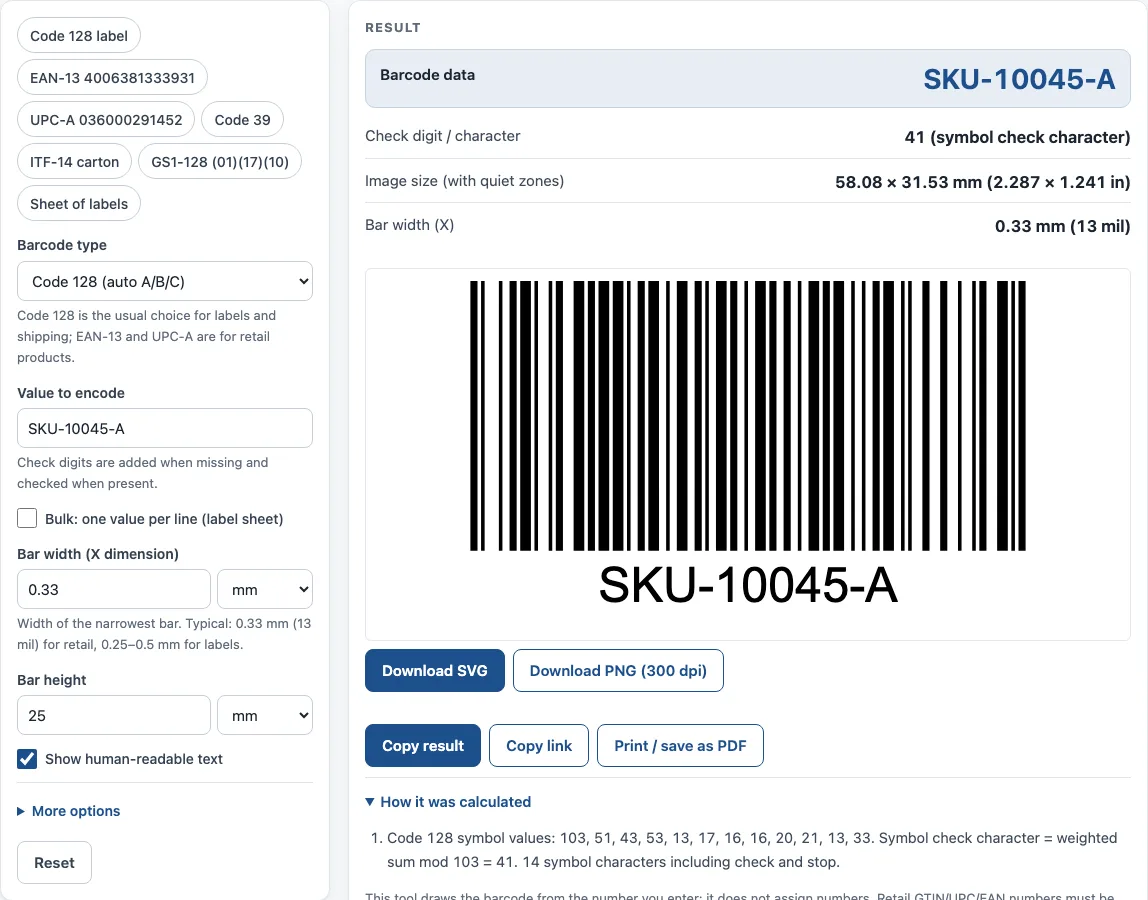
How to use the Barcode Generator
- Open Barcode type (symbology) and choose a type. Code 128 is the usual choice for labels and shipping. EAN-13 and UPC-A are for retail products.
- Type your number or text in Value to encode. For EAN, UPC, ITF-14 and GS1-128, check digits are added when missing and checked when present.
- For Code 39 or Interleaved 2 of 5, tick Add check character if you want one added.
- Set Bar width (X dimension). The help text suggests 0.33 mm for retail and 0.25–0.5 mm for labels.
- Set Bar height, Bar color and Background color. Keep bars dark on a light background.
- Choose PNG resolution (300 or 600 dpi) for print, or use Download SVG for a vector file for label software.
- Tick or clear Show human-readable text and Keep quiet zones (blank margins).
- Read the result: the encoded data, the check digit or character, the image size and the bar width. If a check digit you typed is wrong, a warning shows the correct one and the barcode uses it.
- For many labels, turn on Bulk: one value per line (label sheet), enter values in Values (one per line), and choose Labels per row (2 to 5). The result counts the labels and shows how many lines were Encoded and how many Failed, with the reason for each failed line in a table. Then download or print the sheet.
Copy link saves a link that restores all your inputs, and Print / save as PDF prints the inputs, result, steps and date.
What is a barcode generator and how does a barcode work?
A barcode generator converts a number or text into a pattern of bars and spaces that a scanner can read. Each symbol is defined by a set of rules, so the scanner can decode the pattern back into the original value. A 1D (linear) barcode is read across one line of bars, which is what this tool produces.
The rules differ by type. Some types encode any character, while others accept only digits. The generator applies the rules for the type you choose and reports whether the value fits them.
Which barcode type should I choose?
Choose the type that your scanner, system or industry expects. Code 128 encodes all 128 ASCII characters and is the usual choice for internal labels, stock, assets and shipping. It switches between code sets to make the shortest symbol, and it adds a mod-103 check character that the scanner checks without showing it in the text.
Code 39 encodes upper-case letters, digits and - . space $ / + %. It is wider than Code 128 for the same data, but many older systems use it. EAN-13 is the worldwide retail barcode with 13 digits, UPC-A (12 digits) is used in the US and Canada, and EAN-8 and UPC-E are short versions for small packs. ITF-14 encodes a 14-digit GTIN on outer cartons. Codabar is still used by some libraries, blood banks and courier forms. GS1-128 carries Application Identifiers such as (01) GTIN, (17) expiry date and (10) batch.
What does the X dimension mean and how wide should bars be?
The X dimension is the width of the narrowest bar. Every other bar and space is a multiple of it. A larger X makes a bigger, easier-to-scan barcode, and a smaller X makes a more compact one. Choose a value that fits the space on your label and the printer’s resolution. Test-scan a printed sample before you print a large run.
Why do quiet zones and bar colours matter for scanning?
Quiet zones are the blank margins left and right of the bars. A scanner uses them to find where the barcode starts and ends. Code 128 needs at least 10 X of quiet zone, so keep the option on unless your label design already leaves that space.
Bar colour also affects scanning. Print dark bars on a light background. Red bars do not scan with red-light laser scanners, because the scanner’s light is absorbed by the red ink and the bars look blank.
Do I need a licence to use a barcode number?
Retail numbers, such as UPC, EAN and GTIN codes, must be licensed from GS1. That licence is what makes the number unique to your product. For internal labels, such as stock, asset tags and warehouse bins, you can use any number or text with Code 128 or Code 39. The tool does not check licences, so confirm your own number before you sell a product.
Should I download SVG or PNG?
SVG is a vector file. It stays sharp at any size, so it suits print work and label software. PNG is a pixel image. For print, choose 300 or 600 dpi. Higher resolution gives crisper bars but a larger file.
Sources
- GS1 General Specifications — GS1-128, EAN/UPC and ITF-14 symbols, quiet zones and X-dimension ranges.
- Code 128, Code 39, Interleaved 2 of 5 and Codabar follow the published symbology rules (ISO/IEC 15417, 16388, 16390 and the Codabar specification; the standards’ text is not reproduced). Every symbology was scan-tested with the independent open-source decoder zxing-cpp.
- GS1 check digit calculation — mod-10 check digits for EAN, UPC and ITF-14.
Worked examples
| Input | Result |
|---|---|
| Code 128 (auto A/B/C): PJJ123C | PJJ123C, 43.56 × 31.53 mm (1.715 × 1.241 in) |
| EAN-13: 4006381333931 | 4006381333931, 37.31 × 27.55 mm (1.469 × 1.085 in) |
| Code 39: CODE39 | CODE39W, 53.79 × 31.53 mm (2.118 × 1.241 in) |
| UPC-A: 03600029145 | 036000291452, 37.29 × 27.55 mm (1.468 × 1.085 in) |
| ITF-14: 1540014128876 | 15400141288763, 54.29 × 34.66 mm (2.137 × 1.365 in) |
Calculated by the tool above with these values.
Frequently asked questions
Is this barcode generator free?
Yes. The tool is free and needs no sign-up. Everything runs in your browser, and nothing you type is uploaded.
Can I use the barcodes on products I sell?
Yes, the results can be used in commercial work, on products, packaging and documents, with no attribution. Retail barcodes, though, need a number licensed from GS1.
Which barcode type should I use for shipping labels?
Code 128 is the usual choice for labels and shipping. Use GS1-128 if your shipment needs Application Identifiers such as expiry date or batch.
Can I make many barcodes at once?
Yes. Turn on bulk mode, enter one value per line, and choose how many labels to place per row. Bulk mode supports up to 500 lines, and the sheet can be downloaded or printed.
Why do I see an error instead of a barcode?
The value does not fit the rules of the barcode type you chose. For example, EAN-13 needs 12 or 13 digits, Interleaved 2 of 5 needs digits only, and Code 39 cannot encode lower-case letters (the tool turns them into capitals). The message under the form says what to change.
Does the barcode text show the check character?
Code 128 carries a check character that the scanner checks but does not show in the text. The Check digit / character line in the result shows the value it calculated.
Is my data uploaded anywhere?
No. Everything runs in the browser, and nothing you type is uploaded.
How do I keep my settings for later?
Use Copy link. The page address keeps all your inputs, so opening the link restores the same result.
Related tools
- UPC barcode generator — UPC-A and UPC-E barcodes for retail products, with add-ons and GS1 sizes.
- GS1 barcode generator — GS1-128 labels with Application Identifiers, EAN-13 and ITF-14 carton codes.
- ISBN barcode generator — the EAN-13 barcode for a book cover, with the ISBN text and price add-on.
- Data Matrix generator — a small 2D code for serial numbers, parts and GS1 healthcare labels.
- UPC check digit calculator — get or verify the check digit of a UPC, EAN, GTIN-14, GLN or SSCC.
- Container check digit calculator — check the ISO 6346 check digit of a shipping container number.
- HTS code lookup — find the US import classification number and its duty rates.
- Code 128 barcode generator — Code 128 with the code sets and check character worked out.
- Code 39 barcode generator — Code 39 with mod 43 check or Full ASCII.
- Random barcode generator — random EAN, UPC, ITF-14 or Code 128 test barcodes with valid check digits.